



What is talent mapping?
Talent mapping is the process of analysing the entire available talent pool for a given position.
Recruiters do a talent mapping to enable realistic hiring goals and anticipate sourcing challenges.
When to do talent mapping? You do talent mapping when you want to solve a hiring problem that requires hiring at scale and/or hiring for positions that are expectedly very hard to fill.
With talent mapping you get a better understanding of the total talent pool for a set of job criteria.
You could also say that you map out the total addressable talent market for a job.
Why do a talent mapping?
Recruitment is getting more data driven.
There is not only an increasing amount of talent data but the data is also getting richer and more accessible.
Nowadays we're talking about a global talent market.
Tech companies who have cross-border impact can hire from all over the world. Especially for the remote first companies the world has become their sourcing ground, instead of being limited to local talent.
This gives rise to the opportunity of tapping into new sources of talent and truly find the best candidate there is.
This is making very ambitious hiring goals achievable.
But how do you know if your hiring goals are aligned with the actual supply of talent?
And do you understand why challenges that you encounter during the sourcing process arise?
Here talent mapping comes in.
What are the benefits of talent mapping?
Better understanding the total talent pool for your defined set of job criteria brings you the following benefits:
- You have a realistic overview of the total size of the talent pool (also knows as the total addressable talent market)
- You prevent going after a talent pool that is just too small to realistically succeed in your hiring goal
- You understand challenges that arise during the sourcing process better and therefore you can better manage them
- You align the expectations of the hiring manager and the actual capability to source for desired candidates
How to do talent mapping?
Talent mapping sounds complex but it doesn't have to be, especially when you already have experience in sourcing.
Step 1. The hiring goal.
Determine the hiring goal together with the hiring manager. Get the key questions answered before you deep dive into the actual search and analytics.
Questions to discuss with the hiring manager:
- What position does the hiring manager needs to fill?
- Why does she needs someone in the position?
- What is the number of hires that she needs?
- And in what time frame?
Tools to use for the hiring goal:
- Primarily conversations optionally supported by tools like Zoom.
Step 2. The profile.
Define the scope of the talent mapping exercise. Determine what the profile of the desired candidate should look like.
Translate the mental picture of the hiring manager of the ideal candidate to a set of job criteria.
The categories of criteria shown below can help you.
But also think about more detailed criteria that are specific to the business domain you're sourcing for, like the industry or economic factors.
Selected job criteria

Set up the profile of the required role(s) for the hiring goal.
In the example we use we source for an Angular Developer.
We include role, skill set and seniority level as job criteria.
We don’t have any geography requirements and no diversity goals. Industry and personality are also no priority criteria.
The required high level profile looks something like this:
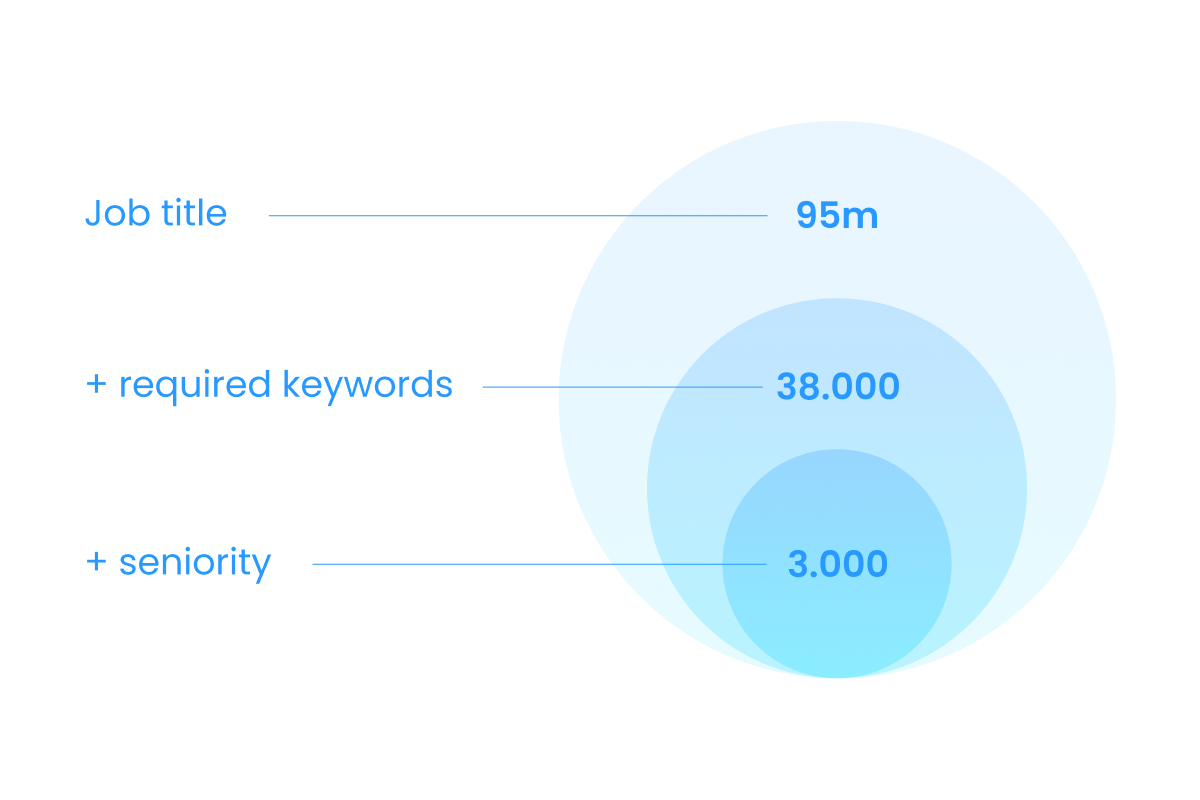
- Job title - engineer (including synonyms like developer)
- Key words - required: Angular, JavaScript, Typescript, RxJS. Optional: Jest, Sass, Karma
- Seniority level: 8+ years experience with the mentioned required technologies
Good to realize is that there is a difference between the addressable candidate and the ideal candidate.
The addressable candidate will be a potential candidate to reach out to but doesn’t necessarily match with all the desired keywords, and the ideal candidate matches all the criteria and keywords, including optional.
Total addressable market vs. ideal candidates

Within the criteria there could be more specific criteria than mentioned here.
In some cases there are also entirely different aspects that should be included in the criteria. An example is a legal criterium like a residence permit.
Tools to use for profiling:
- O*NET OnLine - the US Department of Labor's occupational database. Look up an occupation and it gives you the alternate titles people actually use for the same job, plus the skills and the technologies attached to it. Free, no account.
- LinkedIn's own title suggestions - start typing a title into a people search and take the variants it offers. They reflect how candidates label themselves, which is what your search is matching against.
Step 3. The search.
Do a search based on the defined job criteria.
Is the eventual number of matching talent big enough to realistically achieve your hiring goal? If not, you want to show the limitations of the talent pool to the hiring manager and remove or adjust job criteria.
The search
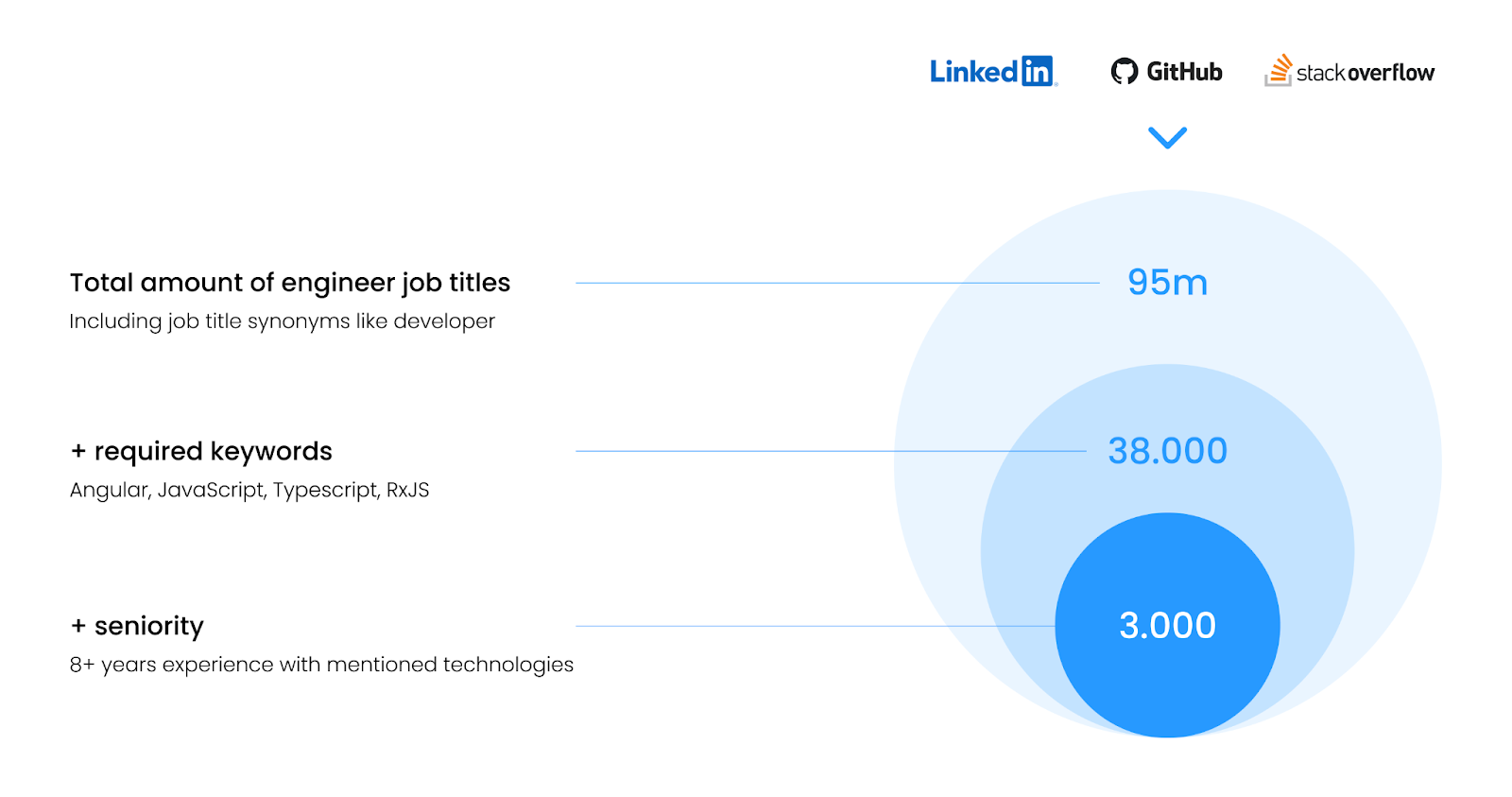
You can use several approaches to finding your total addressable talent market:
> Strip then refine: start with a limited set of criteria to find the total market, then refine your search.
> Refine then strip: begin with a strict set of criteria and strip criteria to increase search results.
To get accurate unbiased results, it is important to realize that LinkedIn is not the only source of candidates. In the example of our developer for instance, a lot more developers can be found on a platform like GitHub than on LinkedIn. This same principle applies to other roles like creative or commercial roles. Read more on cross platform sourcing here.
Tools to use for searching:
- Platforms like GitHub, Stack Overflow, Wellfound (the startup talent marketplace that used to be AngelList Talent, spun out under its own name in 2022) or any of the other platforms to search for candidates
- LinkedIn and LinkedIn Recruiter, for the broadest professional index and for Boolean search on top of it
- LinkedIn Talent Insights, if you have access to it. Its Talent Pool Report is the closest thing to talent mapping sold as a product: you enter job titles, filter on location, skill, company, industry, function, years of experience and company size, and it returns the pool broken out across tabs for location, company, industry, education, skills, titles and employer brand. Note that it is a separate licence from LinkedIn Recruiter, so most recruiters do not have it.
- HeroHunt.ai as a cross platform search tool, for running one query across those platforms instead of one per platform
HeroHunt.ai
Step 3 is the step that decides whether the rest of the exercise is honest, because every number in step 4 is a multiple of the count you carry out of it. Search a single platform and you do not get a small pool, you get a wrong one: the Angular profile above sits partly on GitHub among people who never maintain a LinkedIn page. HeroHunt.ai runs the search across LinkedIn, GitHub and the other platforms in one query and screens the results with language models against the required versus optional criteria you separated in step 2. Two honest caveats. It hands you a result set, not the aggregate tabs LinkedIn Talent Insights produces, so the geography and employer breakdowns in step 4 are still yours to build. And it is a sourcing layer rather than a database you file a map in, which is exactly why step 5 below calls for a different kind of tool.
Step 4. The analysis.
A number is not a map.
Step 3 gives you a count. Step 4 turns that count into something a hiring manager can decide on.
Ask three questions of the pool you just found:
- Is it big enough? Compare the pool size to the number of hires in the goal, not to your gut feeling. That is the funnel math below.
- Where is it? Break the pool down by country and city. A pool of 4,000 that sits 80% in a timezone or a jurisdiction you cannot hire in is not a pool of 4,000.
- Who has it? Break the pool down by current employer. If a third of the market sits at three companies, your talent mapping has just become a competitor analysis, and your outreach and your offer both have to answer that.
Then do the funnel math. This is the part that turns talent mapping from an interesting slide into a hiring forecast.
Work backwards from the goal, using your own historical rates rather than benchmarks from a blog:
- Total addressable pool (from step 3)
- × the share you can actually reach (you have contact details, or a way in)
- × your reply rate
- × the share of repliers who are genuinely interested
- × your interview-to-offer and offer-acceptance rates
An illustration with our Angular example: a 3,000 person addressable pool, 60% of it reachable, a 20% reply rate, a quarter of repliers genuinely interested, and a 20% conversion from interested to hire leaves you roughly 18 hires of headroom.
If the hiring goal is 2, the pool is not your problem and you should stop worrying about it. If the goal is 30, you and the hiring manager need a different conversation, today, before anyone sends a single message.
That conversation is the entire point of the exercise. You are not there to say no. You are there to show which criterion is costing the most talent, and what removing it buys.
Sensitivity is easy to test: re-run the step 3 search with one criterion dropped at a time. Take the 8+ years down to 5+ and watch what the pool does. Drop RxJS. Add a second country. You now have a priced menu of trade-offs instead of an argument about whether the role is hard.
Tools to use for the analysis:
- A spreadsheet. Genuinely. The funnel is five multiplications, and it belongs somewhere the hiring manager can change a number and watch the answer move.
- Your ATS reporting, for your own reply, interview and acceptance rates. Use yours, not averages.
Step 5. The map you can act on.
Most talent mappings die in a slide deck.
The exercise gets done, the hiring manager nods, the criteria get adjusted, and six months later somebody runs the whole thing again from scratch because nobody can find the list.
A map is an asset. Treat it like one.
Two things make it durable:
> Store the people, not just the number. The output of step 3 is a set of profiles. Keep them somewhere searchable, with the segments from step 2 attached as tags: required keywords versus optional, seniority band, country, current employer. When the next role in that market opens, step 3 is already done.
> Record the criteria and the date. A map is a snapshot of a market that moves. Write down the exact search criteria you used and when you ran them, so that next quarter you can re-run them and read a direction of travel instead of a fresh number with no context.
A spreadsheet does the second job fine and the first job badly. Once you are storing profiles you want an ATS or a recruitment CRM with a real candidate database behind it: somewhere that enriches a profile when you import it, lets you tag and filter on the segments you defined, and surfaces those people again against a new job. Manatal is the cheap end of that category and is where we would point a small team.
Manatal
Talent mapping produces a list of people you will not contact for months, which is exactly the asset a spreadsheet loses. Manatal is an ATS with a candidate database underneath it: it enriches profiles you import from LinkedIn or a CV, lets you tag them with the segments you defined in step 2, and re-surfaces past candidates against a new job description when the role finally opens. The Professional tier is $15 per user per month billed annually ($19 month to month), and the 14-day trial does not ask for a card.
The caveat matters more here than on most articles. Professional caps at 15 active jobs and 10,000 candidates, and a talent map is the one recruiting artefact that is designed to be large: any map of a broad market will hit that ceiling. At that point you are really comparing the $35 per user per month Enterprise tier, where jobs and candidates are unlimited. If your map is a few hundred people in a niche, Professional is plenty. If the map is the market, price Enterprise from the start.
The talent mapping checklist
Talent mapping is not a research project. Done properly it is a half day of work that saves a quarter of wasted sourcing.
Run it in this order:
- Agree the hiring goal with the hiring manager: which role, why, how many, by when.
- Translate the ideal candidate into criteria, and separate the required ones from the optional ones. Addressable is not the same as ideal.
- Search across the platforms where the talent actually is, not only LinkedIn, and get a count.
- Analyse it: size against the goal, geography, employers, and the funnel math. Re-run with one criterion dropped at a time to price the trade-offs.
- Store the map, with its criteria and its date, somewhere you can act on it later.
The output is not a number. It is an agreement with the hiring manager about what is realistically hireable, backed by data instead of opinion, and a pool of people you can go back to.
Step 3, in one query: search across the platforms your candidates actually use, not only the one that indexes them.